Make your website easier to find.
Connect keyword research, rank tracking and site audits to a clear list of fixes. Review the issues holding your pages back, then approve supported changes or hand precise instructions to your developer.
Included on every plan. Actions use credits.

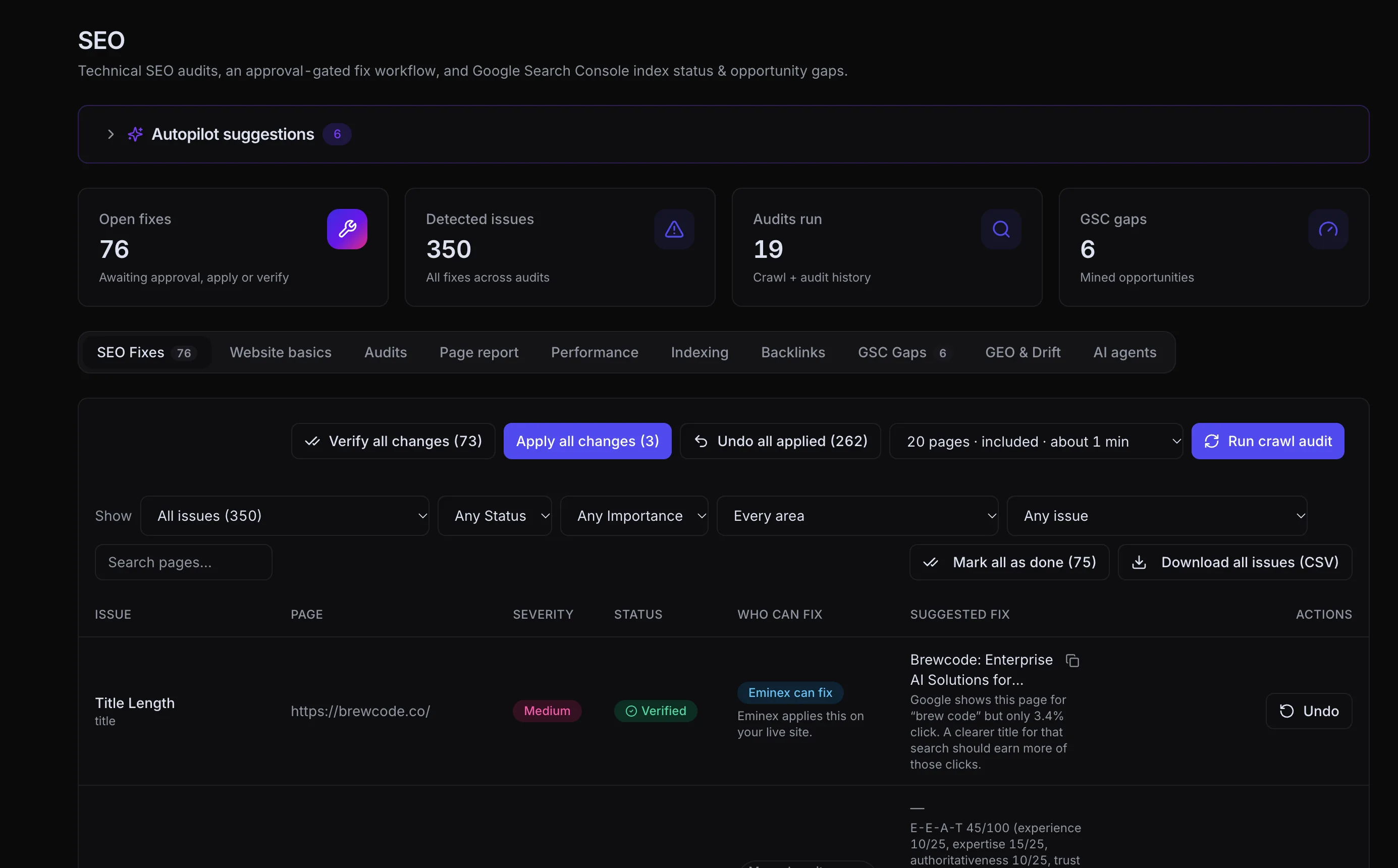
Find the issue. Review the change. Verify the result.
View full sizeYour search data should lead somewhere.
Connect the terms people search, the pages they discover and the issues holding those pages back.
FROM QUERY TO PAGEA practical guide to your next stage of growth
A useful answer starts with the right context. Explore ideas, workflows and next steps for your growing team.
Search ConsoleQueries, clicks & positionsGoogle AnalyticsSessions & engagement{
"@type": "Article",
"headline": "Your useful guide",
"author": "Your brand"
}Apply supported fixes after review. For the rest, get the exact change to make in your platform or code.
Focus on the searches that matter.
Bring keyword research and rank tracking together so your content plan reflects the topics you want to be discovered for.
Turn an audit into a priority list.
Review issues across titles, descriptions, indexing and other technical signals. See what the finding means before deciding how to address it.
Know who handles each fix.
Apply supported SEO changes after review. For issues Eminex cannot fix directly, use the instructions in your platform settings or share them with your developer.
Find it. Fix it. Prove the work.
Research, technical health, performance, indexing and fixes belong in one continuous process.
Start with the searches that matter.
Bring Google Search Console queries, keyword research and ranking changes together. Find pages that are getting impressions but missing clicks, then choose the opportunities that deserve your attention.
- Keyword discovery and search intent
- Page-level ranking and query context
- Competitor keyword and backlink research
See what is holding each page back.
Crawl your site and keep an audit history. Inspect page reports for metadata, broken links, indexing signals and structured data, with a clear path from an issue to the page it affects.
- Technical issues and crawl errors
- Titles, descriptions and canonical signals
- Page reports and audit history
Make page speed a practical to-do list.
Find slow pages and understand why they feel slow. Eminex separates Google's Lighthouse test results from real-visitor Core Web Vitals, where field data is available, and explains the next fix to investigate.
- LCP: how quickly main content appears
- INP: how quickly a page responds
- CLS: how stable the layout stays
A finding should come with a next step.
Review proposed changes before applying them. Supported fixes can be applied through connected platforms; code and platform-specific work comes with guidance. Verify the result and keep the change history in view.
- Approval-gated changes
- Apply and verify supported fixes
- Undo supported changes when needed
Help search engines find the right pages.
Inspect indexing status and Search Console opportunity gaps. Check metadata, canonical choices and structured data so important pages have a clearer path from discovery to a useful search result.
- Search Console indexing context
- Search snippets and metadata
- GEO readiness and content drift
Connect the fix back to search performance.
Return to rankings, queries and analytics after the work is done. See what changed over time and choose the next page to improve, with the search signal and the action in the same workspace.
- Rankings and search visibility
- Search Console clicks and impressions
- Google Analytics engagement context
The details behind a healthier site.
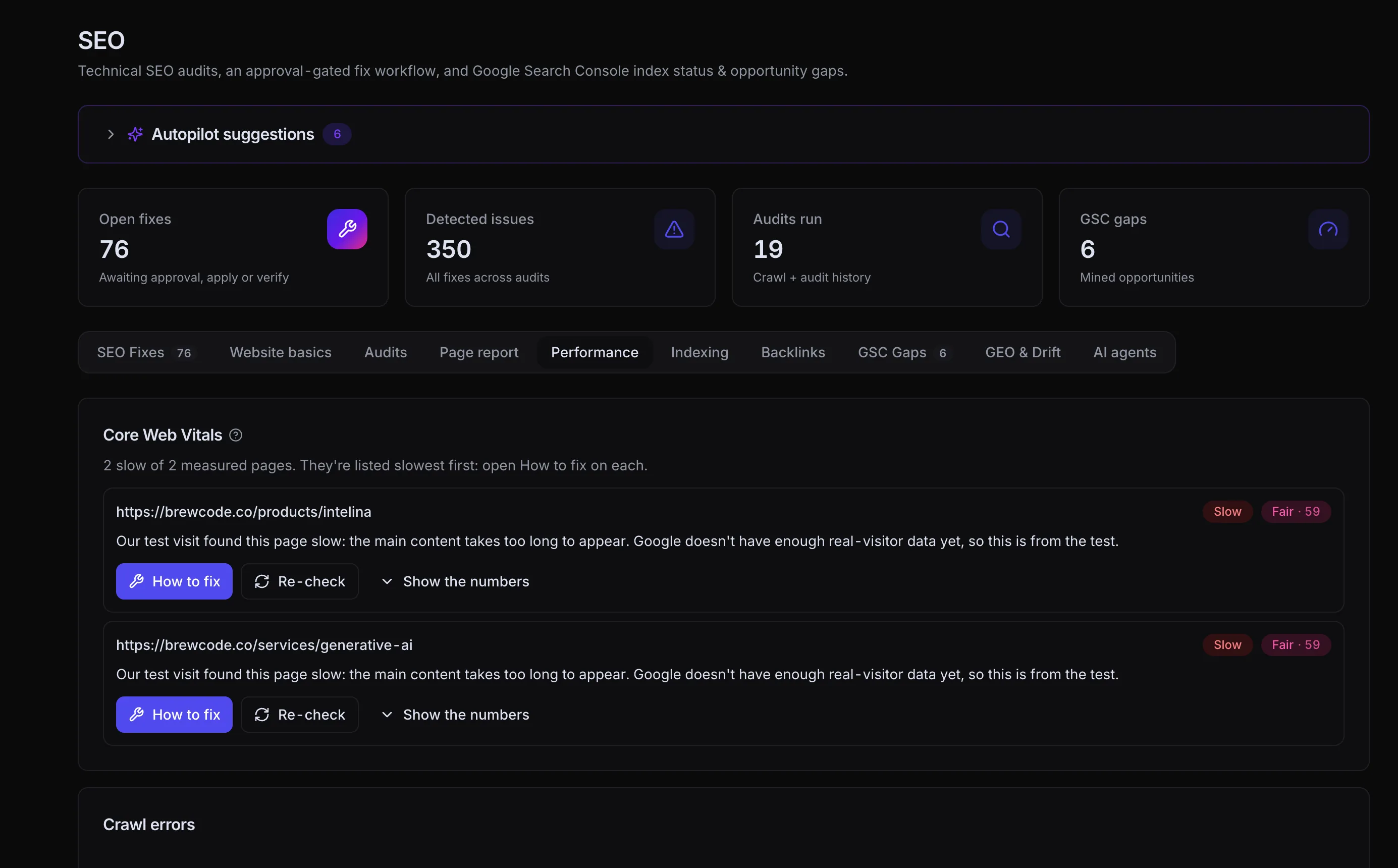
See which pages need attention, with guidance on what to fix.
View full sizeYour judgment stays in the workflow.
Review the recommendation, understand the change, and decide what goes live. Connected-platform support determines which actions Eminex can apply directly.
Search engine optimization
questions.
Site audits, keyword research, rank tracking, Google Search Console data and a list of fixes ranked by impact — titles, descriptions, structured data, broken links, speed and indexing issues.
On WordPress, WooCommerce and Shopify it applies the fixes you approve through its plugin or app, and you can undo them. On other platforms it shows the exact steps or the code for your developer.
Eminex re-checks the page after a change, keeps tracking your rankings and checks each page's status in Google, so you can see what moved.
No one can. Eminex fixes what you control on your site and shows you how rankings and clicks respond.
Connects with the tools you already use.
Keep your next step connected.


Become part of the answer.
See when AI assistants mention your brand, which sources they cite, and where competitors appear instead.
Content engine


Go from blank page to published.
Plan, draft and review content in your brand voice. Publish to your connected CMS when it’s ready.
Paid advertising


Give every campaign a next move.
Bring creative, campaign monitoring and proposed optimizations together across Google, Meta, LinkedIn, TikTok, Pinterest and X — plus WhatsApp click-to-chat ads.
Great work deserves
to be found.
Turn your next opportunity into your next move.
Meet your new marketing workspace.